Case study · JTL-Wawi
Automatic consolidated invoicing for JTL-Wawi
All deliveries in a period on one invoice, fully automated: customers are activated with a checkbox, orders are collected and billed as one consolidated invoice on the cut-off date. Using JTL-Wawi's built-in tools, with no add-on and no subscription fees.
- System
- JTL-Wawi
- Industry
- B2B retail
The starting point
What wasn't working
B2B customers often order several times a week. In JTL-Wawi that means a separate invoice for every order, so ten orders a month means ten documents the customer has to book and pay individually. That burdens accounting on both sides and makes your offer needlessly unattractive to large customers.
To this day, JTL-Wawi doesn't come with automatic consolidated invoicing: the feature was announced and then postponed. If you need it, you end up with paid subscription add-ons or with manual work, where someone has to pick out and merge the right orders at the end of the month. Neither scales well, and with the manual route, a forgotten or double-billed order is only a matter of time.
The solution
How it works
The solution builds consolidated invoicing entirely from JTL-Wawi's built-in tools: workflows, custom fields and JTL-Ameise. A customer takes part as soon as a checkbox is ticked in their master data. Their actual payment method stays untouched, and they can be switched back just as easily.
From activation onward everything runs by itself: incoming orders are automatically offset so they stand at zero euros, and the goods are picked and delivered as usual. On the billing cut-off date, the system combines all of the customer's delivered orders into one consolidated order and creates the invoice with the delivery period stated, optionally with automatic email delivery and direct debit. How detailed the invoice is can be chosen per customer: every line item individually with date and originating order, or compactly one line per order.
Three fixed safety rules make sure the invoice only contains what's correct: only fully delivered orders are billed (open ones are held back), cancelled orders never end up on a consolidated invoice, and every order is billed exactly once. Every run documents itself with a log and a CSV check report that compares expected and actual amounts per order. Discrepancies stand out immediately, without any database access.
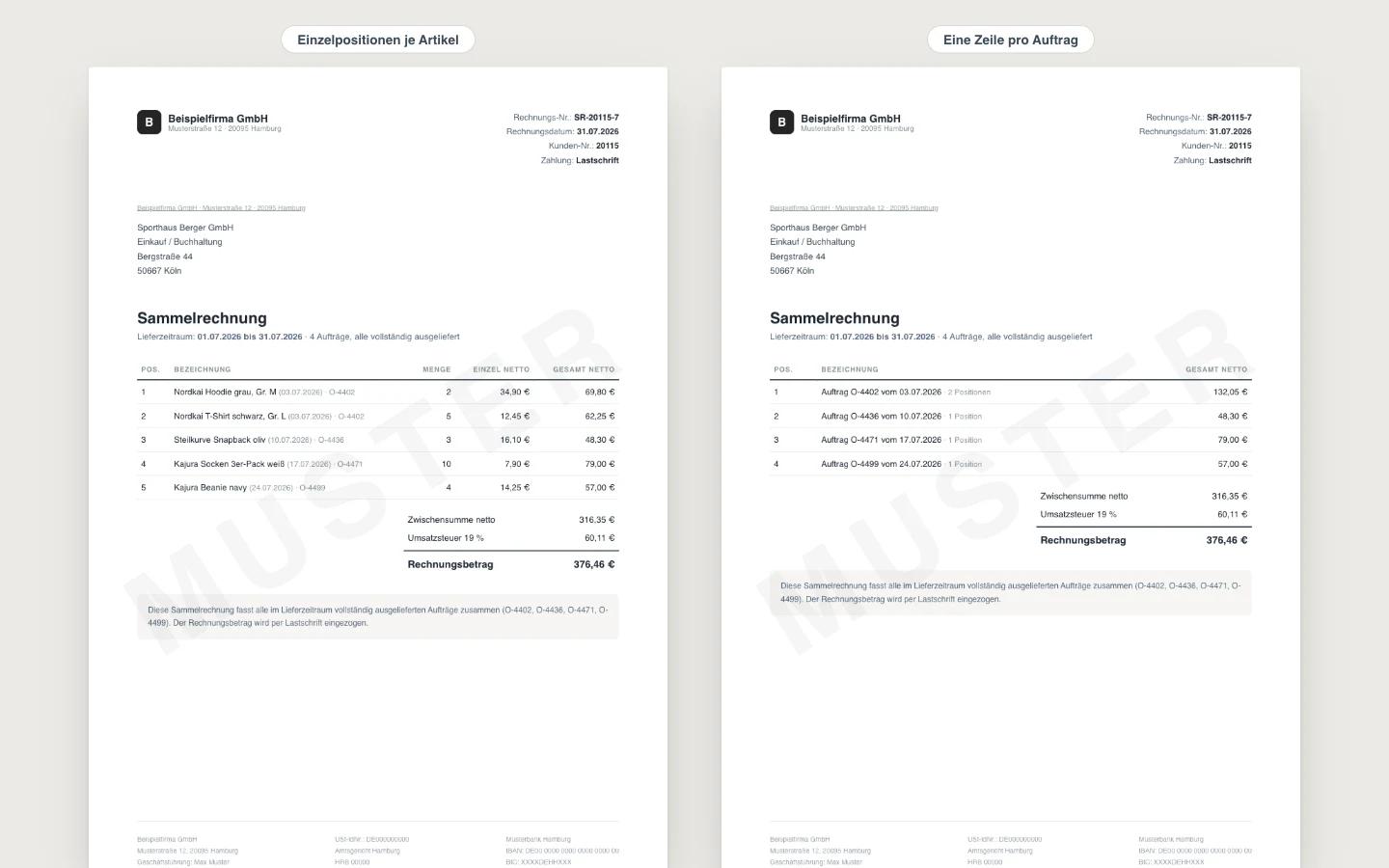
Both views are examples with sample data. I'll of course adapt the invoice's design and layout to your wishes and templates.
Activate customers with a checkbox
One checkbox in the customer master data is all it takes; from then on new orders go into the consolidated invoice. The customer's actual payment method is kept.
controlled per customer
Collect and bill
Orders are automatically offset and delivered as usual. On the cut-off date, the consolidated order and invoice are created with the delivery period stated, optionally sent by email.
e.g. at month end
Level of detail as you like
Selectable per customer: every line item individually with order date and originating order, or compactly one line per order with the order total.
set per customer
Safety rules and check report
Only delivered orders, no cancellations, no double billing. Every run produces a log and a CSV check report with expected and actual amounts per order.
verifiable in Excel
The result
What it changes day to day
- One invoice per customer and period instead of dozens of individual documents, a noticeable relief for accounting on both sides
- Fully automated from incoming order to finished invoice, nobody has to remember the cut-off date
- Double billing is impossible: every order lands on exactly one consolidated invoice, exactly once
- Only delivered goods are billed, cancelled orders stay out
- Only JTL-Wawi's built-in tools, no add-ons and no ongoing subscription fees
- One direct debit run and full traceability per order, a real service argument for large customers
For your business
What you get
I can set this solution up in your business too: adapted to your processes and documented so your team can work with it right away.
Set up at a fixed price including a test run and guides. Quote after a short, free initial call.
- Setting up the complete workflow chain in your JTL-Wawi, including a test run
- Custom fields on the customer for activation and level of detail, maintainable by your team without technical knowledge
- Invoice layout with the delivery period stated, optional automatic email delivery
- A CSV check report per billing run for a quick cross-check in Excel
- A user guide for your team plus a ready-made customer information sheet to present the offer to your B2B customers
FAQ
Quick answers
Can't JTL-Wawi do this out of the box?
No, automatic consolidated invoicing isn't included so far. The feature was announced and then postponed. On the market there are subscription add-ons or manual approaches. This solution uses only built-in tools: workflows, custom fields and JTL-Ameise.
How do I switch a customer to consolidated invoicing?
With a checkbox in the customer master data; from then on new orders go into the consolidated invoice automatically. It can be switched off again just as easily at any time.
What happens to orders that haven't been delivered yet?
They're deliberately held back and only billed in the next run, once their line items are final. That way the invoice only shows what was actually delivered.
How do I know a consolidated invoice is complete?
Alongside the log, every billing run produces a CSV check report: one line per order with expected amount, actual amount and status. Discrepancies stand out immediately, without any database access.
Does it work with my payment methods and tax rates?
The customer's actual payment method stays untouched; the consolidated invoice itself uses a fixed payment method such as direct debit. With mixed tax rates, the line-item layout is used. We settle both during setup.
Want this running in your business?
Describe your current process in two sentences. I'll get back to you with an honest assessment of what's possible.
Send a no-obligation request